



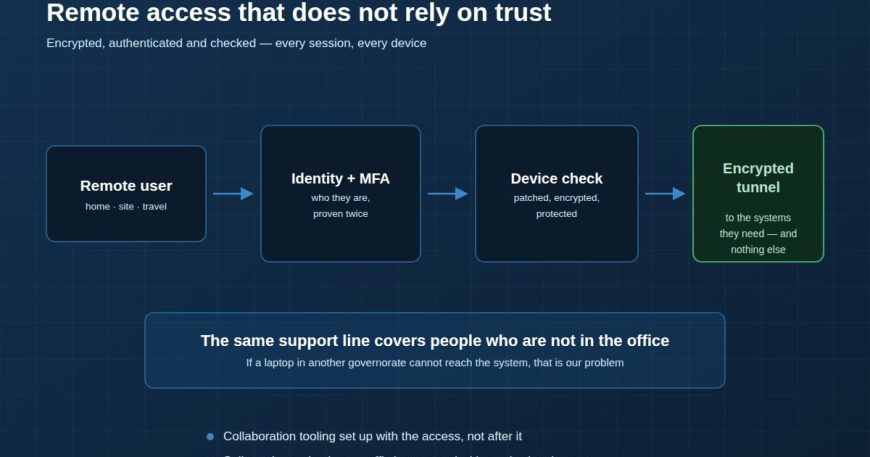
For a long time remote access had a simple shape: a VPN concentrator at the edge, a client on the laptop, a username and password. Once you were through the tunnel you were on the network, and being on the network was treated as proof that you belonged there.
That model made sense when the tunnel was the hard part. It does not survive contact with credential theft, which is now the most common way into a business.
What a VPN does and does not do
A VPN encrypts traffic between a device and your network. That is genuinely valuable — it means a hotel wireless network or a mobile connection cannot read the traffic. It is also the entirety of what it does.
It does not establish that the person typing the password is the employee. It does not check whether the laptop is patched, encrypted or already infected. And in most default configurations it does not limit what the connected device can reach once it is inside.
Three additions that change the risk
1. Multi-factor authentication, on every session
If a password is the only thing between the internet and your network, then a phished password is a breach. Multi-factor is the single highest-value control available for remote access, and the objection — that it is inconvenient — has largely dissolved now that push approval and passkeys have replaced typing codes. Apply it to every account. The exception you make for one executive is the account that will be targeted.
2. Device posture checks
Before a connection is allowed, ask the device to prove some basic things: the disk is encrypted, the endpoint protection is running and current, the operating system is patched to an agreed level, and the device is one you know about. A personal machine with an unpatched OS should not get the same access as a managed corporate laptop, and the connection is the natural place to enforce that.
3. Access to what is needed, not to everything
The old model put remote users on the network. The better model gives them a route to the specific systems their role requires and nothing else. This limits the damage from a compromised session, and it makes the logs far more useful — a request for something outside a user’s normal scope becomes visible rather than being lost in general traffic.
Split routing, done deliberately
Sending every packet from a remote laptop through your office — including video calls and software updates — makes the experience worse and your internet link busier. Sending everything direct removes your visibility. The workable answer is deliberate split routing: business systems through the tunnel, general internet direct, with web filtering applied on the device rather than at the office edge.
The support side, which is usually forgotten
Remote users are the hardest people to help. They have no colleague to look over their shoulder and no engineer down the corridor. If your support model assumes someone can walk to a desk, it does not cover the people who most need it. A laptop in another governorate that cannot reach the system is a support problem, not the user’s problem, and the contract should say so.
Encrypted, authenticated and checked — every session, every device. Any one of those three on its own leaves the obvious gap.
We build remote access that does not rely on trust, and support the people using it. VPN & Remote Work →

