



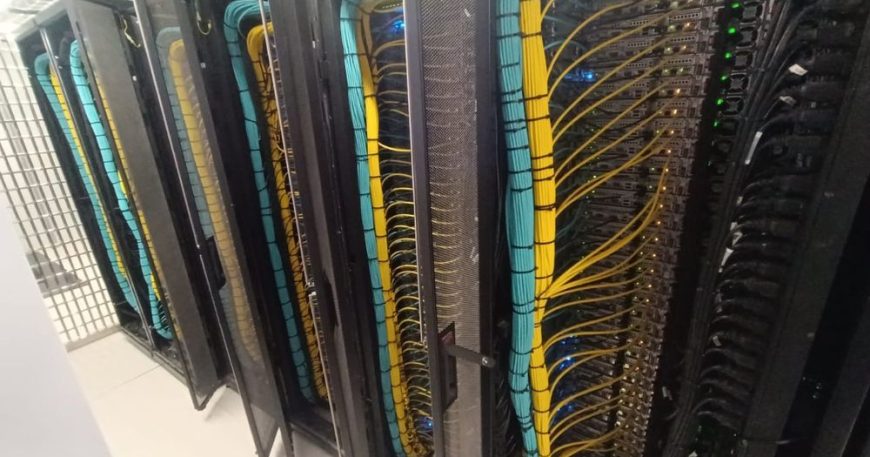
High-performance computing looks like a compute problem and turns out to be a facilities problem. The servers are the straightforward part — they arrive, they rack, they boot. What determines whether the cluster runs at its rated capacity or spends its life throttling is power, cooling and cabling, decided months before the hardware is ordered.
These are the lessons that transferred from building one.
Power density changes the room, not just the rack
A conventional server rack in an Egyptian office data hall might draw 3 to 6 kW. A populated GPU rack can draw several times that. This is not a matter of adding more sockets. It affects the distribution boards, the UPS sizing and runtime, the generator, and often the incoming supply itself.
The lead time on electrical work is longer than the lead time on servers. If power is not resolved first, expensive hardware sits in boxes.
Cooling is about airflow, not temperature
Setting the room cooler does not fix a hot rack. What matters is whether cold air reaches the front of the equipment and hot air leaves the back without mixing. The unglamorous items do most of the work:
- Blanking panels in every empty U. Without them hot exhaust air recirculates to the front of the same rack.
- Containment so hot and cold aisles do not mix.
- Brush strips on cable entries, for the same reason.
- Floor tile placement matched to actual load rather than distributed evenly.
These cost very little and have more effect on delivered cooling than another unit of capacity.
Cable management is a thermal decision
In a normal rack, untidy cabling is an aesthetic complaint. In a high-density rack it obstructs airflow at the rear, and obstructed airflow is throttled compute. Cable routing, correct-length patch leads and proper management arms are part of the thermal design, and they should be specified in the build rather than tidied afterwards.
Weight, and the floor
A fully populated GPU rack is heavy — enough that raised floor loading and the route from the loading bay need checking before delivery. This sounds obvious and is missed regularly, usually on the day the pallets arrive.
Two networks, planned together
Compute clusters need a low-latency interconnect for node-to-node traffic and a separate management and provisioning network. Designing them together avoids the common mistake of running the interconnect across a switch that was sized for ordinary traffic, which caps the performance of the entire cluster at its slowest link.
Document it while it is fresh
Rack elevations, port schedules, power distribution per rack, thermal readings at commissioning. The commissioning figures matter especially: when someone reports the cluster is slower a year later, the only way to know whether the environment drifted is to have measured it at the start.
The pattern holds across every build we have done: the compute is the predictable part. Power, cooling and cabling are where projects are won or lost.
If you are planning one
Start with the facility, not the specification. Establish what power and cooling the building can actually deliver, what it would cost to increase, and how long that takes. Then size the cluster to fit, or plan the facility work as the first phase. The alternative — specifying the compute and discovering the constraints afterwards — is how a six-month project becomes an eighteen-month one.
Design, build, configure and operate — the same team throughout. See our project work →
