TP-Link Omada Networks in Egypt: Controller, Switching & Wi-Fi
TP-Link Omada · Egypt
One controller. The whole network behaves.
Omada is the stack we put into most client networks: controller, switching and access points managed as one system instead of a cupboard full of unrelated boxes.
What TP-Link says about working with us
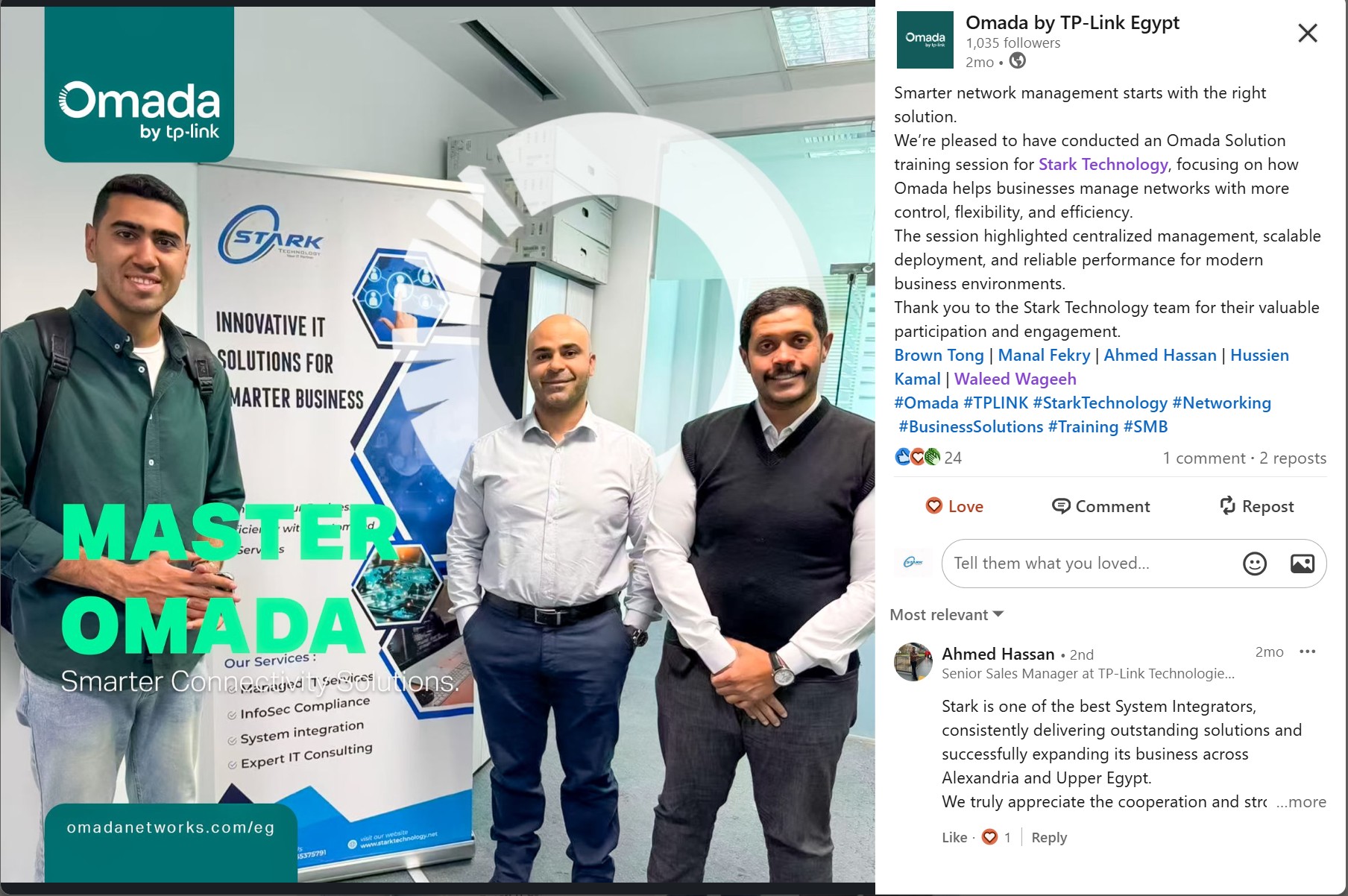
Omada by TP-Link Egypt ran a dedicated Omada Solution training session for the Stark Technology engineering team, covering centralised management, scalable deployment and performance for business environments. Their own summary of it:
The post as published by Omada by TP-Link Egypt, including the comment from TP-Link's Senior Sales Manager. Screenshot of a public LinkedIn post, reproduced with attribution.
“We’re pleased to have conducted an Omada Solution training session for Stark Technology, focusing on how Omada helps businesses manage networks with more control, flexibility, and efficiency.”
Omada by TP-Link Egypt · published on LinkedIn
On the same post, TP-Link’s own sales leadership added:
“Stark is one of the best System Integrators, consistently delivering outstanding solutions and successfully expanding its business across Alexandria and Upper Egypt.”
Quoted verbatim from a public LinkedIn post and its comments. Reproduced with attribution.
Why Omada, and why so often
Most small and mid-sized offices in Egypt end up with a network that grew by accident, a router from the ISP, a switch someone bought, access points added one at a time. It works until it does not, and then nobody can tell you why.
Omada replaces that with a single managed system: one controller, one view of every switch and access point, one place to change a VLAN or a Wi-Fi password. It is the reason we reach for it first on office builds and refits.
Central control
Hardware or software controller, adopted switches and access points, consistent configuration pushed from one place. Changes stop being site visits.
Seamless roaming
Multi-floor and multi-building coverage where a laptop or a handset moves between access points without dropping the call.
Segmentation that holds
Guest, staff, voice, cameras and management kept apart properly. VLANs and SSIDs designed together rather than bolted on afterwards.
Track record
We have been deploying and managing Omada for clients since 2020. Starting with hardware cloud controllers and PoE access-point estates, and running them since. It sits in a large share of the networks we manage today, across Alexandria, Cairo and Upper Egypt.
Deployment
What was delivered
Technology services client Alexandria · since 2020
Omada hardware cloud controllers deployed to centrally manage the access-point estate: PoE-powered, no per-device licence cost, still in service.
Multi-floor office networks Cairo & Alexandria
Controller-managed switching and Wi-Fi with segmented guest, staff and voice networks, structured cabling and centralised configuration.
Managed clients Egypt
Omada runs as part of the managed service: firmware cycles, capacity checks and coverage changes handled by us, not left to the client.
Client names are withheld under confidentiality. References can be provided directly, on request.
What we actually configure in an Omada deployment
Omada is easy to install badly. Adopt the devices, accept the defaults, and you have a network that works in an empty office and falls apart when eighty people arrive. The controller is not the design. It is what lets you apply one. Here is what we decide before anything is mounted.
The design, before the hardware is ordered
Access point count from coverage, not headcountA rule of thumb per user gives you the wrong number in both directions. We work from the floor plan, the wall materials and where people actually sit, an open floor and a corridor of solid-walled offices need completely different counts for the same headcount.
PoE budget calculated firstEvery access point and every phone draws from the switch’s power budget, and the total is not the sum of the port maximums. We check the budget against the real device list before ordering, not when the last unit refuses to boot.
Uplink capacityAccess points that can serve a gigabit each, hanging off a switch with a single gigabit uplink, is a bottleneck you built deliberately. Uplinks and aggregation sized against the access layer.
Cable lengths and where fibre is neededCopper Ethernet stops at 100 metres including patch leads. Long runs between buildings or across large floors are planned as fibre at design time. It is far cheaper than discovering it during installation.
Controller placementHardware controller, software controller on a server, or cloud-based management, chosen for the estate rather than by habit, and positioned so losing it does not take the network with it.
The wireless design, where most Omada estates are lost
Channel planNon-overlapping channels assigned deliberately across floors and neighbouring tenants. Leaving every access point on automatic in a dense building produces access points that keep changing channel and clients that keep dropping.
Channel width chosen for densityWide channels look faster on a single-laptop speed test and reduce the number of usable channels dramatically. In a busy office, narrower channels and more of them beat one impressive benchmark.
Transmit power turned down, not upThe instinct is to raise power when coverage is poor. That makes clients hear an access point they cannot reliably talk back to, and stops them roaming. Power is tuned down so cells are clean and handover happens.
Minimum data rates raisedLegacy low rates left enabled let one old device slow the whole cell and let clients cling to a distant access point. Disabling them is the single most effective fix for “the Wi-Fi is slow” in a busy building.
Band steering and fast roamingCapable clients pushed to the higher bands, and fast-roaming standards enabled so a call survives a walk between access points instead of dropping at every handover.
Mesh only where cable genuinely cannot goEvery mesh hop costs throughput. It is a solution for a listed building or a temporary site, not a way to avoid pulling a cable.
Segmentation, and the rules that make it mean something
VLANs designed with the SSIDs, not afterStaff, guest, voice, cameras, printers and management each in their own VLAN, mapped to the right SSID or port profile from the start. Retrofitting segmentation onto a flat network is a re-cable in all but name.
Guest network properly isolatedClient isolation on, its own address space, no route to anything internal, bandwidth capped, and a portal if the business wants one. Guest Wi-Fi bridged onto the office LAN is the most common fault we inherit.
ACLs between segmentsThe rules that make the VLANs mean something. Cameras and building systems can reach their recorder and nothing else.
Management out of reachThe controller and device management on their own VLAN, not reachable from the guest or general user network, with strong unique credentials and multi-factor on cloud access.
Switching and operations
Port profiles instead of per-port fiddlingProfiles defined once and applied, so adding a floor is a repeatable action rather than an afternoon of manual configuration and one port somebody gets wrong.
Loop protection and spanning treeEnabled deliberately. A patch lead plugged into two wall ports by a helpful member of staff should cost one port, not the whole site.
Firmware kept in stepController and adopted devices upgraded together on a schedule. Mixed firmware across an estate is where the strange, unreproducible faults live.
Configuration backed up off the controllerAn exported configuration held outside the device, so a failed controller is a replacement rather than a rebuild from memory.
Monitored as part of the managed serviceDevice health, client counts, channel utilisation and capacity trended by us, so the third access point on the second floor gets replaced before anyone raises a ticket.
Which controller, and when
Option
What it suits
What to watch
Hardware controller
Single site or a small group of sites. Low power, no server to maintain, no per-device licence.
Device count limits per unit. Check the headroom before you grow into it.
Software controller
Larger estates and multi-site management, where it can live on existing virtual infrastructure.
It is now a server you have to patch, back up and keep available.
Cloud-based management
Distributed sites and remote support without a VPN into every branch.
Account security becomes network security. Multi-factor is not optional.
Adopted devices keep forwarding traffic if the controller is unavailable. You lose management and central changes, not the network. We still design so that does not happen.
Omada is not the answer to every network. Where the requirement is deep routing, large-scale campus switching or advanced security enforcement, we will say so and specify Cisco or Fortinet instead.
What we will not do is sell you the more expensive stack for a building that does not need it.
Send us a floor plan and a headcount
That is genuinely enough to start. We will tell you how many access points you need, where they go, and what the switching underneath has to be.